
Home
Data Matching Flow
- Details
- Written by Super User
- Category: Fuzzy Data Matching, Record Linkage and Data Deduplication

Data Matching Flow with QDeFuZZiner software
In order to be able to use QDeFuZZiner software successfully, we need to understand general flow of a data matching project.
The same general principles apply to a data de-duplication project as well, which differs only in importing the same original input dataset twice, as both left and right dataset, and setting flag "Deduplication (instead of Matching".
Here is the graphical presentation of a typical data matching project:

Description of major phases involved in data matching or de-duplication project:
Project Creation
First step is to create a new project record.
Input Data Importing
Each project is dealing with matching of two input datasets, called "left dataset" and "right dataset", being imported from .csv files.
In this step you need to register both input datasets and then trigger procedure of their import into QDeFuZZiner database, where further data processing will take place.
In case of a data-deduplication project, the same input dataset has to be registered and imported as both left and right dataset.
QDeFuZZiner software imports only .csv files directly, so if you have your input dataset in other formats, such as Excel spreadsheets, you will need first to export them into corresponding .csv files, in UTF-8 format. Fortunately, all spreadsheet softwares has such option of exporting into .csv files. Our recommendation is to use LibreOffice Calc, which has most versatile options for data exporting.
As a good practice, it is recommended that before importing, you do basic preprocessing of input datasets, such as trimming whitespaces, doing proper capitalization (small and big letters), unified formatting of dates etc. Such data preparations will increase quality of fuzzy data matching.
Also, it is advisable to add a column with unique row identifiers, if not already present. It is always recommended, but for data de-duplication it is in fact a must, because you will need to set-up "<>" operator in exact matching constraints for ID columns of left and right dataset.
Solution Creation and Definition (i.e. setting up data matching model)
After input datasets are imported into QDeFuZZiner database, next step is to create a new Solution and define initial data matching model, which we will polish later.
Adding Columns into Data Matching Constraints
By using Fields Picker tool, we need to add column pairs from left and right datasets into applicable sections, for building our data matching model.
Available sections for adding column pairs are: Exact Matching Relations, Fuzzy Matching Relations, Other Constraints and Merged Columns.
After we added data matching constraints into applicable sections, we are ready to fine-tune our model.
Setting Up Exact Matching Constraints
By default, column pairs added to Exact Matching Constraints will have "=" (equal) operator assigned. However, if we are dealing with data de-duplication project, we need to use "<>" (not equal) operator instead, on ID columns from left and right dataset. That is important, because we don't want to compare a row from original dataset with itself (remember that for data de-duplication project we are importing the same original dataset twice, as both left and right dataset).
Setting Up Fuzzy Matching Constraints
In this section, we need to define relative weights for each columns pair. By default, each column pair gets the same relative weight, i.e. the same importance, which is not optimum.
QDeFuZZiner provide two alternative tools for automatic setting-up recommended relative weights. However, these tools are not perfect and you will need to judge it critically and manually adjust relative weights afterwards. Setting-up perfect relative weights is typically matter of trial and error - you will typically experiment with slight variations of the model, until you get satisfactory result.
Setting Up Other Constraints
This section is used to define additional exact matching constraints on individual columns from left or right dataset.
You will use it if you wish to constrain data model to certain custom sub-range, for example to certain town or gender, etc.
Such constraints must be manually defined.
Setting Up Merged Columns
"Merged Columns" is a very powerful, but complex section, with many parameters and options available, which you can use for creation of additional merged columns in final resultset, but also for merge/consolidation of duplicate rows.
It is important to understand that merging is performed not only horizontally (i.e. accross a matching row), but also vertically (i.e. accross all matching rows for the same matched entity). This is especially important in case of deduplication, where thus you can de-duplicate, while preserving data of all duplicate records, through consolidation options. In other words, you can enrich surviving rows from duplicate rows, during de-duplication process.
Solution Execution
After we defined our initial data matching model, we are ready for execution of the model, in order to retrieve resultset.
Typically, it is a cycle of multiple executions, resultset inspections, data model adjustments and fine-tuning, until you get perfect result.
Once data model is optimized, you can use it for repetitive executions of the same data matching model, with fresh imported data. You just need to re-import new data and execute already saved data matching model.
A) Solution Execution in 3 Consecutive Steps
For initial data model adjustments and fine-tunings, you will use this 3-step approach.

Solutions are saved as records of table of solutions, where each record represents a solution, containing definition of parameters and constraints to be applied. Solution execution actually involves two separate sub-phases, which we call "blocking phase" and "detailed fuzzy match phase". Result of the first phase is so-called "solution base table", while result of the second phase is final resultset.
Blocking phase, i.e. creation of solution base table is a time-consuming operation, which, depending on the datasets size and number of columns included into fuzzy match comparison, can take anything from few minutes to few hours to few days to finish! On the contrary, final resultset creation is executed in matter of seconds or minutes. Therefore, there is much sense to follow this recommended three-step approach: you first define solution parameters and constraints, then create solution base table (blocking phase), then open similarity distribution tool to visually determine area of optimum threshold values, then consecutively vary threshold values (inside previously determined optimum range) and execute detailed fuzzy match phase until getting satisfactory results.
1. Execute Blocking Phase
"Blocking" phase is phase in which a subset of best matching candidate record pairs are chosen from the whole universe of all possible combinations.

Blocking phase is actually sequence of two distinct consecutive sub-phases:
a) Sub-phase of rough similarity filtration (blocking)
By using rough filtration on similarity, best candidates (those matching pairs which have string similarity greater than blocking similarity limit) are passed-through and saved into an intermediate table called "solution base table".
b) Detailed similarity calculation
After best candidates are saved, then detailed similarity calculation takes place for each passed-through record pair.
The most important parameter we need to define for blocking phase is called "blocking similarity limit". This value represents a similarity threshold that is used in so-called "blocking phase". Term "blocking" is used here to designate phase in which Cartesian product of all possible combinations of records from left and right dataset is constrained, i.e. narrowed down to a much smaller subset of combinations, according to some blocking similarity criteria. This is very important sub-phase, because for medium and big datasets, detailed fuzzy match calculation would become infeasible (extremely time consuming), if we would compare and analyze all possible combinations in detailed similarity calculation sub-phase.
The bigger is the blocking similarity limit value, the less number of record pairs will be saved in the solution table and consequently next phase (detailed fuzzy match phase) will be faster. However, if the blocking similarity values is too big, we risk to omit true matches.
When a solution definition is executed, QDeFuZZiner creates a table for a solution, which we call "solution base table". This table is constructed as combination of records from left and right datasets, according to exact and fuzzy matching constraints and blocking similarity limit. Solution base table thus contains subset of left and right dataset records combinations, which satisfy condition of blocking similarity limit. Only combinations saved into the solution table are then analyzed in the detailed fuzzy match sub-phase.
Besides blocking similarity limit, parameter "Use dictionaries (yes/no)" also influences on the solution base table creation. If dictionary is used, strings used for blocking and detailed phase are lexemized into lexems, according to selected dictionary. Lexems are then used for similarity calculation instead of original words. This can be useful in cases of big strings, such as verbose product descriptions, because lexemization decreases variations in related words.

Of course, exact and fuzzy match constraints also influence blocking phase. Adding exact matching constraints can dramatically reduce time for execution of blocking phase and also improve accuracy of fuzzy matching model.
Immediately after rough filtration of candidate record pairs, detailed calculation of string similarity is executed on the passed-through records.
Overall result of the blocking phase is intermediary table stored in the database, called "solution base table", which contains record-pairs with calculated string similarity values.
2. Analyze Similarity Function Distribution
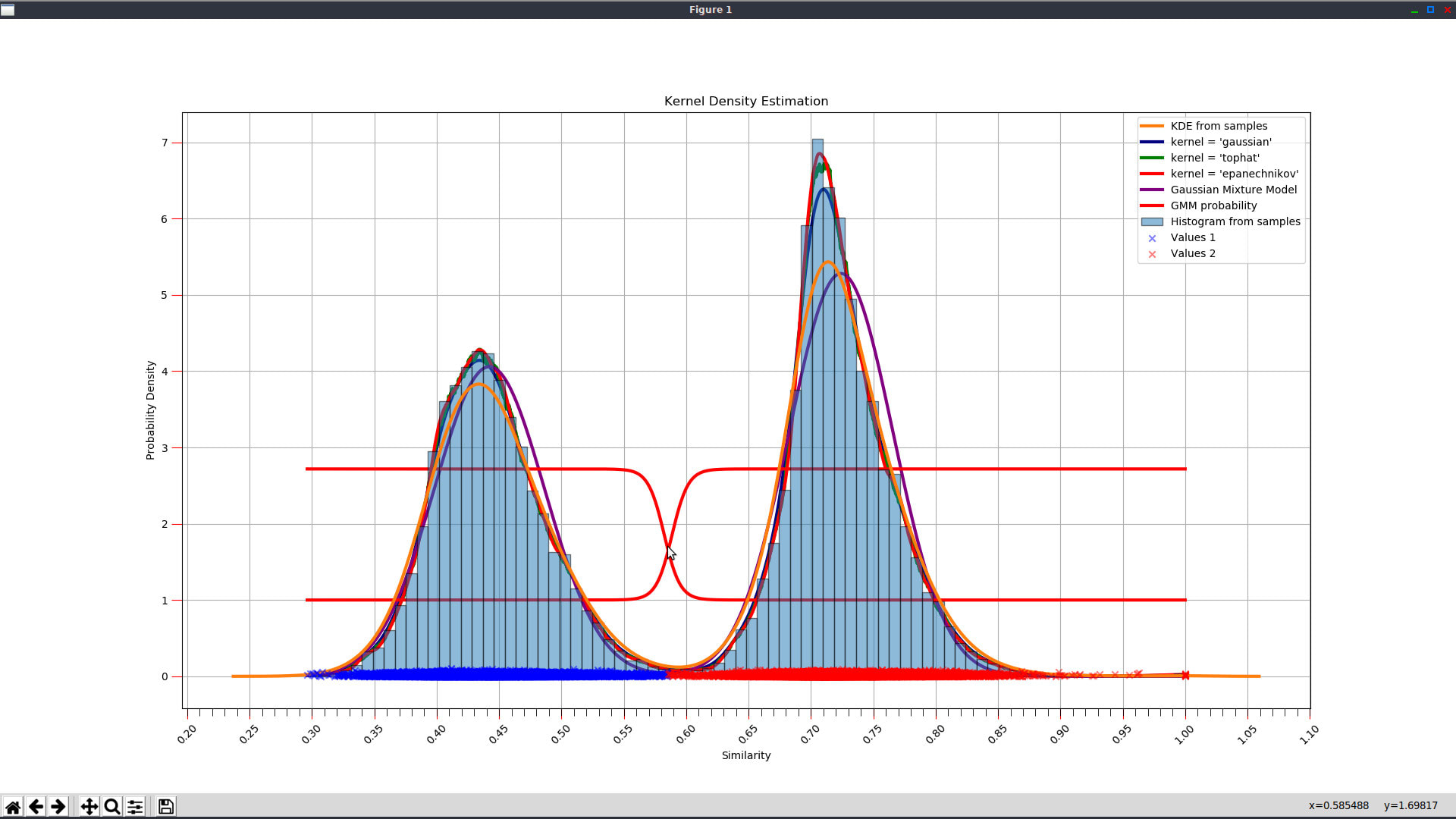
After blocking phase is executed and solution base table is saved in the database, we can investigate similarity function distribution visually, in order to determine appropriate similarity threshold to discern matches from non-matches. QDeFuZZiner provide and advanced tool for similarity function distribution graphical representation, along with mathematical functions trying to provide a clue what would be the optimal threshold.
3. Get Final Resultset
In this phase, value of the "similarity threshold" parameter is used to discern between matches and non-matches. Result of this detailed fuzzy match phase is creation and saving of a resultset table which is then loaded into the datagrid, from which it can be exported into a spreadsheet or flat file.
Besides similarity threshold, this phase is also influenced by exact and fuzzy matching constraints. It is also influenced by the "Join Type" and "Return only best matching record (yes/no)" parameters.

B) Solution Execution in 1 Step
Execution in one step is suitable for re-running a solution on updated (re-imported) input datasets, when you expect that new imported data will not substantially change already defined data matching model.

Resultset Exporting
After a solution is executed, resultset will be saved as a new table in the database and will be presented in a datgrid, from which we can filter, sort, search and export results into a spreadsheet.

Further Reading
Introduction To Fuzzy Data Matching
Managing QDeFuZZiner Projects
Importing Input Datasets into QDeFuZZiner
Managing QDeFuZZiner Solutions
Demo Fuzzy Match Projects
Various Articles on QDeFuZZiner
Our Data Matching Services
Do you wish us to perform fuzzy data matching, de-duplication or cleansing of your datasets?
Check-out our data matching service here: Data Matching Service
QLeadsGen - business contacts web scraping software
- Details
- Written by Super User
- Category: QLeadsGen - business contacts web scraping software
Introduction
Are you looking for business contacts for a specific industry, to whom you will target your marketing activities?
QLeadsGen is an email finder tool and business leads generation software, scraping web sites and extracting publicly available, published business information, such as e-mails, phones, URLs, names, organizations, locations and addresses, according to provided search criteria or by specifying list of web-sites to be scraped.
Once business data is extracted, QLeadsGen software is able to match e-mails with corresponding entities, providing you final consolidated list of e-mails contacts with additional information on corresponding names, organizations, locations, web-sites and phones.
In past we have been using classical search engines (such as Google, Bing, Yahoo), but recently we have switched to artificial intelligence search engine, which understands human language and context, allowing you to define precise search query for targeted industry domain and geographical location. This was a huge improvement in getting high quality search results for B2B, publicly available contact data.
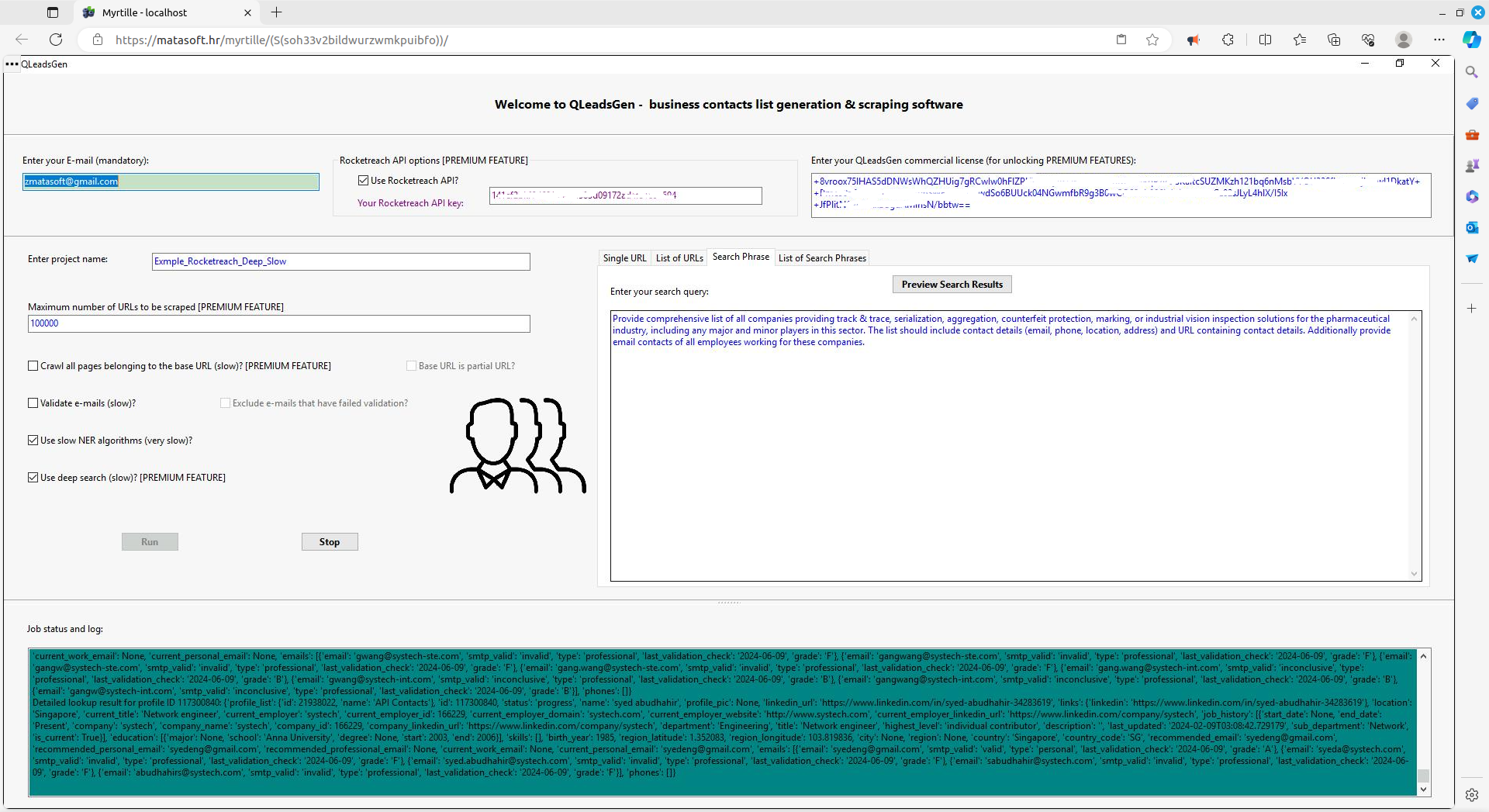
We have also introduced additional support for utilizing Rocketreach platform. By utilizing Rocketreach API, you wil get additional, high-quality individual personal lookup contact details. For this feature, however, you need to purchase appropriate API key from Rocketreach: https://rocketreach.co/pricing

Why to choose QLeadsGen software?
QLeadsGen is a powerful and intuitive software that helps you to generate leads by utilizing advanced artificial intelligence (AI), which is collecting contact data from multiple sources (search engines, directories, social media, websites). Due it's capability to understand human language and context, It can quickly and accurately identify targeted companies, organizations and persons.
QLeadsGen is a powerful and intuitive lead generation software that helps businesses and organizations to identify and qualify potential customers. With its advanced algorithms and user-friendly interface, QLeadsGen makes it easy to generate high-quality leads, increase sales, and drive growth.
One of the key benefits of using QLeadsGen is its ability to automatically identify and qualify potential customers. The software uses advanced artificial inteligence algorithms to analyze large amounts of data, including social media, web analytics, and other sources. This allows businesses to quickly and easily identify the most promising leads, without having to manually comb through large amounts of data.
Overall, QLeadsGen is an invaluable tool for any business or organization looking to generate high-quality leads and drive growth. Whether you're a sales professional, marketing manager, or simply someone looking to increase your customer base, QLeadsGen can help you achieve your goals.
QLeadsGen is the perfect choice for those looking for a reliable, cost-effective and efficient lead generation software. Try it today and experience the power of QLeadsGen!
How it works
QLeadsGen is scraping targeted web sites, according to search phrase or according to specific list of URLs provided by user.
If using search engine, QLeadsgen software will provide you extracted information from artificial intelligence (AI) provided response, but will also additionally inspect AI provided web links and scrape them directly, searching for additional contacts.
If using additional option of Rocketreach API, then the software will provide additional individual personal contacts (employees), otherwise not retrievable by publicly available sources.
The overall final curated list thus contains combination of contact data extracted from:
- artificial intelligence (AI) search engine response
- scraped web sites
- Rocketreach API (if used)
While crawling a web site, the software is extracting e-mails, phones, web URLs, names, organizations, locations and addresses. We want to emphasize that our scraping software is only crawling what is already publicly presented by web site owner, thus doing what you would do manually, but much faster of course.
Emails, phones, web addresses and physical addresses are recognized by certain patterns. Entities such as organizations, names and locations are recognized by advanced NER (Named Entity Recognition), i.e. NLP (Natrual Language Processing) algorithms.
In next step, our set of algorithms are matching list of e-mails with other corresponding data, thus providing final matched spreadsheet containing e-mails matched with names, organizations, locations, addresses, phones and web-site URLs.
QLeadsGen provide option of validating e-mails. Phones are also validated.
When web scraping and data matching is finished, results are zipped and mailed to your e-mail address.
Besides final consolidated matched business leads list, you also get separate documents containing raw data mining results.
QLeadsGen Features
QLeadsGen provides following features:
- web scraping of URLs, defined by entering search phrase, specific list of URLs or entering single URL
- option to utilize Rocketreach API
- option to crawl all web pages belonging to a web-site (deep crawling i.e. deep scraping)
- option of deep searching
- option to validate e-mails
- validation of phones
- extraction of entities: names, organizations, locations
- extraction of web site addresses (URLs)
- generation of consolidated spreadsheet of business contacts, by matching e-mails with corresponding names, organization, locations, addresses, web-sites and phones
Free Version
In free version, there are several limitations:
- you are limited to mining maximum 100 URLs in a session
- you cannot use option of deep crawling (scraping all web pages belonging to a web site)
- you cannot use option of deep search
- you cannot utilize Rocketreach API
Premium (Paid) Features
By purchasing license key, you get unlocked premium features:
- unlimited number of URLs to be scraped, limited only by user-input
- option of deep crawling, i.e. scraping all web pages belonging to a web-site
- option to use deep search option, providing more in-depth search for contacts
- option to utilize Rocketreach API
QLeadsGen App Link
QLeadsGen application can be accessed on the following link:
By clicking this link, you will open new QLeadsGen remote desktop session, presented to you via Myrtille as a web app.
Happy scraping!
Purchase Licence
You can purchase QLeadsGen monthly subscription license key, unlocking premium features, here:
Purchase QLeadsGen License Key
Input Parameters
E-Mail address
Valid e-mail address is mandatory. Scraping and data matching results, zipped into a file, will be sent to this e-mail address. Note that e-mail address is being validated.

Project Name
Project name is not mandatory. If you enter it, QLeadsGen will use it for zipped folder name with scraping and data matching results.

License Key
License key is not mandatory. If you don't enter it or entered license key is invalid, you will be limited to free version features.

If you have purchased the license and want to copy/paste it here, you need to synchronize QLeadsGen remote desktop clipboard with you desktop. Use corresponding Myrtille dashboart "Clipboard" option.


Now you can use standard CTRL+V to copy the text into the QLeadsGen application.

Define URLs to be scraped
Enter a Phrase for Search engine
QLeadsGen is utilizing advanced artificial intelligence (AI) search engine, capable of understanding human language with all context and meaning.
Construct your search criteria by using precise and comprehensive English language, having in mind that response text provided by AI should contain all data later be extracted by QleadsGen: emails, phones, company/organization names, web site links (URLs) etc.
Use this search query as an example how to properly construct a precise query instruction:
"
Provide comprehensive list of all companies providing track & trace, serialization, aggregation, counterfeit protection, marking, or industrial vision inspection solutions for the pharmaceutical industry, including any major and minor players in this sector. The list should include contact details (email, phone, location, address) and URL containing contact details. Additionally provide email contacts of all employees working for these companies.
"
Notice that you have available button "Preview Search Results" to test / preview search engine results, thus providing you possibility to fine-tune search query before commencing scraping process. Example of preview:
Enter list of URLs
If you already have specified list of web-sites to be scraped, you can enter in two ways.
Enter list of URLs manually
You can manually enter list of URLs to be crawled, line by line.

If you are using copy/paste, don't forget that you need to use Myrtille dashboard option "Clipboard" to synchronize the clipboard first.


Copy/paste comma-separated list of URLs
Instead of entering manually list of URLs, line by line, you can alternatively copy/paste list of URLs separated by comma.

Enter Single URL
If you wish to scrape only single specific web-site, enter it iin the Single URL tab.

Maximum number of URLs
You can enter maximum number of web-site URLs to be scraped in the session. Note gowever that in the free version you are limited to 100 URLs only, so if you enter number greater than 100, it will be ignored.

Deep Crawling (Premium Feature)
In paid version you have option to crawl (i.e. scrape) not only specified web addresses, but also all web pages belonging to the same web site. If you haven't provided license key, this option will be ignored.
If you use deep crawling, be aware that it will tremendously slow-down scraping process, especially if target web sites have many web pages.

As a sub-option, you can choose whether root URL or partial URL (URL provided by user input) is considered as base URL for which all sub-pages will be crawled. By default it is the root URL to be considered as the base URL, meaning that all web pages belonging to the domain will be scraped.

Validation of E-mails
You can choose whether you wish to validate scraped e-mails or not. If you choose validating e-mails, this will slow-down the scraping process.

Using Advanced NER i.e. NLP algorithms
By default, only fast NER (Named Entity Recognition) i.e. NLP (Natural Language Processing) algorithms are enabled.
You can additionally switch-on slow and resource-extensive algorithms, which will increse quality of data extraction (names, organization / company names, locations), but with expense of much longer runtime.

These additional algorithms will increase quality of entity extraction and data matching, however bare in mind that scraping process will be much, much slower.
Using Deep Search option (Premium Feature)
In paid option you can switch-on "Deep Search" optipn

Utilizing Rocketreach API (Premium Feature)
QLeadsGen now supports integration with Rocketreach via API. This option is available only if you purchase QLeadsGen commercial license.

RocketReach is a comprehensive B2B sales intelligence and lead generation tool designed to help businesses find and connect with potential customers, prospects, and key decision-makers. It offers a wide range of features and capabilities that streamline the process of gathering contact information and conducting outreach campaigns. RocketReach provides access to a vast database containing information on over 700 million professionals and 35 million companies worldwide. The database includes detailed contact information such as email addresses, phone numbers, and social media profiles.
By combining QLeadsGen precise search and extraction of companies and organizations performed by advanced artificial intelligence search engine and NER algorithms with the vast personal contacts database of Rocketreach, QLeadsGen can provide comprehensive sales leads list.
In order to utilize this option, you would need to purchase QLeadsGen commercial license and separately purchase API key from Rocketreach: https://rocketreach.co/pricing
Starting and Stopping Scraping Process
You will notice two buttons, one for starting scraping and another for stopping already started process.

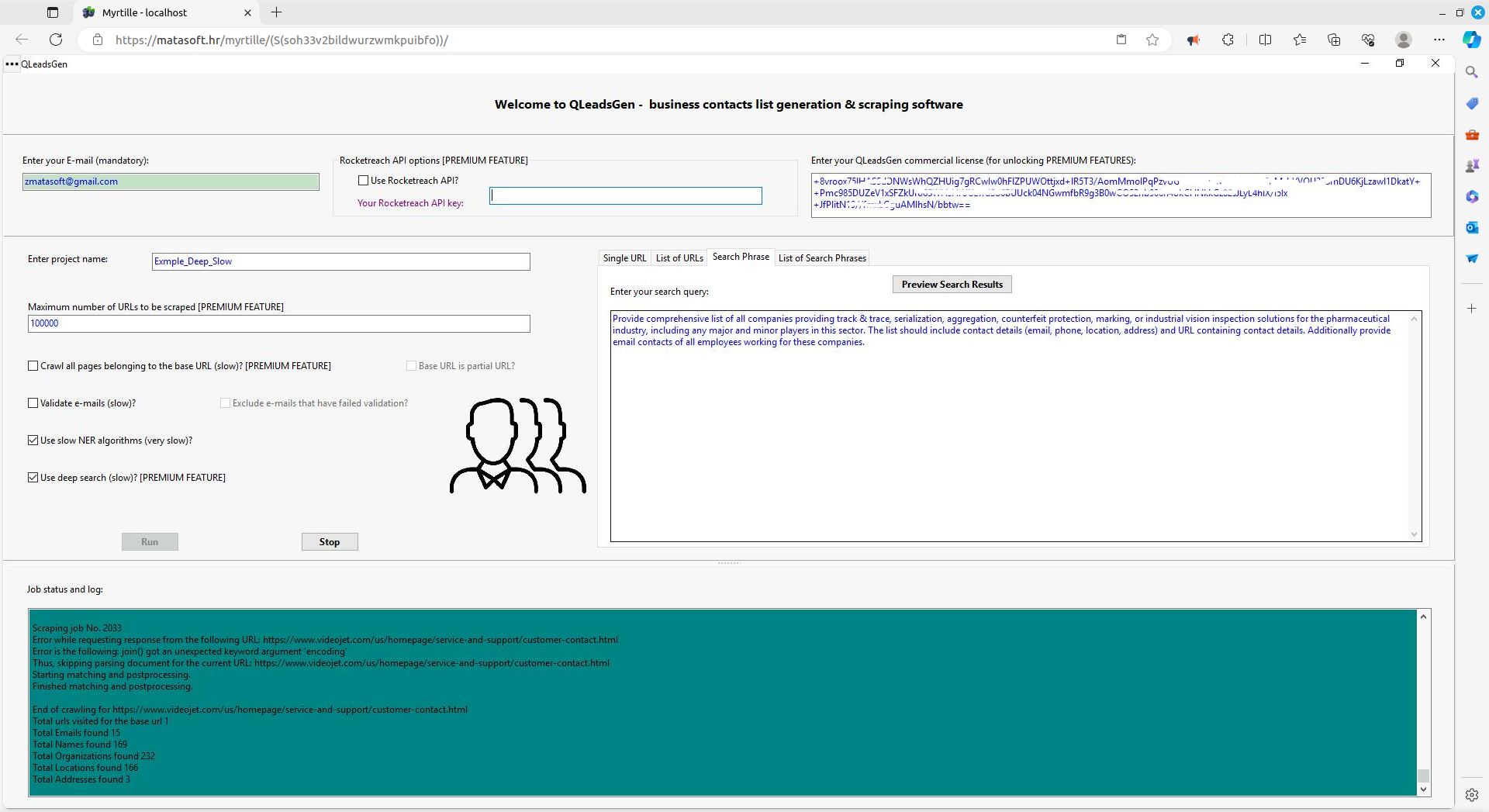
When you start a process, QLeadsGen will track on it's status terminal detailed information on the scraping process progress.

Myrtille Options
Myrtille (https://github.com/cedrozor/myrtille) is a software enabling publishing remote desktop programs as web applications.
You will notice small button with three dots ("...") in the upper left corner. Whne you click it you can show or hide Myrtille related set of options, determining behavior of the QLeadsGen integration with your web browser.


As already explained, most important option is "Clipboard", that has to be used for proper copy/pasting of values (such as license key) into QLeadsGen app.
Output Results
When scraping and matching process is finished, you will receive e-mail with zipped folder containing results.
Sort files, in order to find files "Matched_Leads.xlsx" and "Matched_Leads.csv", which contain consolidated list of business e-mails matched with names, organizations, location, addresses, web-sites and phones.


Inside the folder, you will also find all raw data extracted from scraped web sites.

Switching on or off available options will influence quality and number of retrieved records of business contacts. You can check how results differ depending on chosen options here:
Comparative examples of scraped leads, by using various QLeadsGen options
Application Limitations
Myrtille related limitations in user interface
The QLeadsGen software is a desktop software being exposed to web browser via Myrtille (https://github.com/cedrozor/myrtille) service. Although it appears as being a web application, it is actually not, but rather a desktop application in a remote desktop session, being exposed as web application. Although being a convenient solution to publish desktop app to web, there are small limitations in user interface, such as need to "synchronize" your desktop clipboard with the application clipboard if you are going to copy/paste something into application. For example, copy/pasting your purchase license or copy/pasting list of URLs to be scraped.
in such situations, for copy/pasting, you will need to use Myrtille dashboard placed in the header of application screen in your web-broser. You will notice the option "Clipboard", to be used for clipboards sync.
Now you can use standard CTRL+V to copy the text into the QLeadsGen application.
Limitations in entity recognition and data matching
We put a lot of attention to utilize best available technologies for entity recognition and data matching, but keep in mind that no such technology can provide 100% accurate results. It is always human being who needs to evaluate and cleanse data mining results at the end.
Regarding entity recognition technologies, we use two sets of algorithm. One is fast and provide reasonably good results. Another one consists of slow and resource hungry algorithms that can provide better results, but with price on downgrading speed of the process. This advanced set of additional algorithms is reserved for licensed users only and is not available in free version.
Session Timeouts
As already explained, QLeadsGen is a remote desktop application, appearing to be a web application, available through web browser. This is possible thanks to Myrtille service (https://github.com/cedrozor/myrtille), which is making possible to access remote desktops, applications and SSH servers through a web browser. QLeadsGen remote desktop application has timeout set for idle sessions to 2 hours. If application session is idle for 2 hours, it will be terminated. By idle time it is meant no user interaction through user interface, even if a scrapping job is running in background. This means that you will need to keep alive your session during long-running scraping processes, by clicking periodically onto the application screen, dragging around console (terminal) window etc. Such user actions will confirm that you are still actively monitoring the scraping process and will restart idle timeout countdown.
Deduplicate Leads List
When scraping business leads by using QLeadsGen lead generation software, you might get multiple duplicate rows for same email contact. That's because QLeadsGen software is scraping contacts from multiple sources, such as response from artificial intelligence search engine, as well as multiple web pages. This results in multiple records for same email contact.
Fortunately, it is very simple to perform deduplication by using free QDeFuZZiner Lite software. Best of all, once defined and saved, deduplication project can be reused for fresh lead lists. All you need to do is to reimport new fresh datasets. Of course, don't forget to add "ID" column into dataset first.
You can find more information here: Deduplicate Leads List
Custom Leads Matching Services
Custom Leads Matching & Consolidation Services
Don't worry, we can de-duplicate your prospects and consolidate contact information coming from duplicate rows. Not only that your prospecting list will now contain only unique contacts, but we will enrich data by merging sparse information from duplicate rows!
You want to merge and combine the contacts list with another business dataset? Let us do it for you!
You need to exclude contacts present in your suppression list? Yep, we can do it too!
Purchase QLeadsGen Software License
- Details
- Written by Super User
- Category: QLeadsGen - business contacts web scraping software

Purchase Licence
You can purchase QLeadsGen monthly subscription license key, unlocking premium features, here:
Purchase QLeadsGen License Key (1-Year)
Purchase QLeadsGen License Key (6-Months)
Purchase QLeadsGen License Key (1-Month)
Alternative purchase link:
QLeadsGen App Link
QLeadsGen application can be accessed on the following link:
Happy scraping!
QLeadsGen Features
QLeadsGen provides following features:
- web scraping of URLs, defined by entering search phrase, specific list of URLs or entering single URL
- option to utilize Rocketreach API
- option to crawl all web pages belonging to a web-site (deep crawling i.e. deep scraping)
- option of deep searching
- option to validate e-mails
- validation of phones
- extraction of entities: names, organizations, locations
- extraction of web site addresses (URLs)
- generation of consolidated spreadsheet of business contacts, by matching e-mails with corresponding names, organization, locations, addresses, web-sites and phones
Free Version
In free version, there are several limitations:
- you are limited to mining maximum 100 URLs in a session
- you cannot use option of deep crawling (scraping all web pages belonging to a web site)
- you cannot use option of deep search
- you cannot utilize Rocketreach API
Premium (Paid) Features
By purchasing license key, you get unlocked premium features:
- unlimited number of URLs to be scraped, limited only by user-input
- option of deep crawling, i.e. scraping all web pages belonging to a web-site
- option to use deep search option, providing more in-depth search for contacts
- option to utilize Rocketreach API
Introduction to QLeadsGen Software
Get QLeadsGen Software
- Details
- Written by Super User
- Category: QLeadsGen - business contacts web scraping software

Get access to QLeadsGen Software
QLeadsGen application can be accessed on the following link:
By clicking this link, you will open new QLeadsGen remote desktop session, presented to you via Myrtille as a web application.
Happy scraping!
QLeadsGen Features
QLeadsGen provides following features:
- web scraping of URLs, defined by entering search phrase, specific list of URLs or entering single URL
- option to utilize Rocketreach API
- option to crawl all web pages belonging to a web-site (deep crawling i.e. deep scraping)
- option of deep searching
- option to validate e-mails
- validation of phones
- extraction of entities: names, organizations, locations
- extraction of web site addresses (URLs)
- generation of consolidated spreadsheet of business contacts, by matching e-mails with corresponding names, organization, locations, addresses, web-sites and phones
Free Version
In free version, there are several limitations:
- you are limited to mining maximum 100 URLs in a session
- you cannot use option of deep crawling (scraping all web pages belonging to a web site)
- you cannot use option of deep search
- you cannot utilize Rocketreach API
Premium (Paid) Features
By purchasing license key, you get unlocked premium features:
- unlimited number of URLs to be scraped, limited only by user-input
- option of deep crawling, i.e. scraping all web pages belonging to a web-site
- option to use deep search option, providing more in-depth search for contacts
- option to utilize Rocketreach API
Purchase Licence
You can purchase QLeadsGen monthly subscription license key, unlocking premium features, here:
Purchase QLeadsGen License Key
Introduction to QLeadsGen Software
Introduction to QLeadsGen Software
Page 4 of 5