
Introduction
(Un)Perplexed Spready is an AI-driven spreadsheet software designed with purpose to utilize AI models for useful work in spreadsheets.Typical examples of such usage are: extracting multiple attributes from a column with unstructired textual description, naming standardization, addressess reformatting and standardization, products categorization and classification.
in this article, we are going to demonstrate how (Un)Perplexed Spready can be used in a real business use case of products categorization according to a predefined alternative taxonomy list, where artificial intelligence can combine taxonomy list lookup referencing with advanced reasoning and with deep internet research.
For this exercise we have used glm-4.7 LLM model provided by Ollama Cloud and matasoft_web_search / matasoft_web_reader tools in (Un)Perplexed Spready.
We will also use this opportunity to demonstrate how to properly reference multicellular ranges from another sheets, using "RANGE:" instruction, which is a syntax specific for (Un)Perplexed Spready software.
Task Description
We have a dataset containing 2751 records of furniture related products being already internally categorized with a hierarchical taxonomy.

The task is to map the products into another alternative taxonomy, being provided in another lookup sheet:

For the sake of this presentation, we are going to use sample subset of 50 rows of the master dataset.
Our Tool - (Un)Perplexed Spready
(Un)Perplexed Spready is an advanced spreadsheet software developed by Matasoft, designed to bring artificial intelligence directly into everyday spreadsheet tasks. Unlike traditional tools like Excel or Google Sheets, it integrates powerful AI language models into spreadsheet formulas, enabling automation of complex data processing tasks such as extraction, classification, annotation, and categorization.
Key features include:
- AI-embedded formulas: Users can utilize advanced language models directly in spreadsheet cells to perform data analysis, generate insights, and automate repetitive tasks.
Multiple AI integration options:
PERPLEXITY functions connect to commercial-grade AI via Perplexity AI’s API, offering high-quality, context-aware responses.
ASK_LOCAL functions allow users to run free, private AI models (like Mistral, DeepSeek, Llama2, Gemma3, OLMo2 etc.) locally through the Ollama platform, providing privacy and eliminating API fees.
ASK_REMOTE functions enable access to remotely hosted AI models, mainly for demo and testing purposes. - User-friendly interface: The software maintains familiar spreadsheet features such as cell formatting, copy/paste, and advanced sorting, while adding innovative AI-driven interactivity.
- Automated data management: Tasks like extracting information from unstructured data, converting units, standardizing formats, and categorizing entries can be handled automatically by the AI, reducing manual effort and errors.
- Flexible for all users: It is suitable for both beginners and advanced users, offering significant time savings and improved accuracy in data processing.
- By embedding AI directly into spreadsheet workflows, (Un)Perplexed Spready transforms the way users interact with data, allowing them to focus on creative and strategic work while the AI manages the labor-intensive aspects of spreadsheet management.
Perplexity AI
Perplexity AI is an advanced AI-powered search engine and conversational assistant that provides direct, well-organized answers instead of just links. It uses real-time web search and large language models to quickly synthesize information and present it in a clear, conversational format.
Key features include conversational search, real-time information gathering, source transparency, and support for text, images, and code. It’s accessible via web, mobile apps, and browser extensions, and is designed to be user-friendly and ad-free.
Perplexity AI is used for research, content creation, data analysis, and more, helping users find accurate information efficiently and interactively.
Ollama and Ollama Cloud
Ollama is a tool that lets you download and run large language models (LLMs) entirely on your own computer—no cloud account or API key required. You install it once, then pull whichever open-source model you want (Llama 3, Mistral, Gemma, Granite …) and talk to it from the command line or from your own scripts. Think of it as a lightweight, self-contained “Docker for LLMs”: it bundles the model weights, runtime, and a simple API server into one binary so you can spin up a private, local AI assistant with a single command.
You can find more information here: https://ollama.com/
Recently, Ollama introduced a new cloud-hosted offering featuring some of the largest and most capable open-source AI models. While Ollama’s local setup has always been excellent for privacy and control, running large language models (LLMs) locally requires modern, high-performance hardware — something most standard office computers simply lack. As a result, using (Un)Perplexed Spready with locally installed models for large or complex spreadsheet operations can quickly become impractical due to hardware limitations.
This is where Ollama Cloud steps in. It provides scalable access to powerful open-source models hosted in the cloud, delivering the same flexibility without demanding high-end hardware. The pricing is impressively low — a fraction of what comparable commercial APIs like Perplexity AI typically cost. This makes it an ideal solution for users and organizations who want high-quality AI performance without significant infrastructure investment.
We’re genuinely excited about this development — Ollama Cloud bridges the gap between performance, affordability, and accessibility. Well done, Ollama — and thank you for making advanced AI available to everyone!
You can find more information here: https://ollama.com/cloud
SearXNG
SearXNG is a free, open-source “meta-search” engine that you can run yourself. Instead of crawling the web on its own, it forwards your query to dozens of public search services (Google, Bing, DuckDuckGo, Mojeek, Qwant etc.), merges the results, strips out trackers and ads, and returns a single clean page. All queries originate from your server/PC, so the upstream engines never see your IP or set cookies on your browser. In short: it’s a privacy-respecting, self-hostable proxy that turns multiple third-party search engines into one, without logging or profiling users.
Open WebUI
Open WebUI (formerly “Ollama WebUI”) is a browser-based, self-hosted dashboard that gives you a ChatGPT-like interface for any LLM you run locally or remotely.
It speaks the same API that Ollama exposes, so you just point it at `http://localhost:11434` (or any other OpenAI-compatible endpoint) and instantly get a full-featured GUI: threaded chats, markdown, code highlighting, LaTeX, image uploads, document ingestion (RAG), multi-model support, user log-ins, and role-based access.
Think of it as “a private ChatGPT in a Docker container” – you keep your models and data on your own machine, but your users interact through a polished web front-end.
Matasoft Web Reader and Matasoft Web Search Tools
Matasoft Web Search and Matasoft Web Reader are free tools provided for Open WebUI by Matasoft. These two tools combine static/dynamic page reading (BeautifulSoup + Selenium). By default they are trying to read web pages using fast method with BeautifulSoup, but if it fails, then the tool will utilize slow method with Selenium + Chrome where JavaScript or SPA content needs rendering. JS need is detected automatically (4-layer heuristics: block patterns, SPA frameworks, text volume, structure). This means you get real text instead of empty shells or JavaScript templates.
Matasoft Web Search tool is utilizing locally installed SearXNG meta search engine.
Matasoft Web Search (matasoft_web_search) tool can be downloaded here: https://openwebui.com/posts/6e255cfc-f187-40d0-9417-3e1ca1d3c9e5
Matasoft Web Reader (matasoft_web_reader) tool can be downloaded here: https://openwebui.com/posts/a7880f57-247d-4883-a250-2dd54e2e6dff
Methodology and AI-driven Formula Used
The full dataset contains 2751 records, but for the sake of this presentation, we are going to calculate only first 50 records.
Since our LLM prompt to be embedded into a spreadsheet formula is pretty long, we are going to put it into a textual cell in a separate sheet called "prompt".
The prompt text is the following: "Input1 contains a product name, Input2 contains internal hiearchical taxonomical category, while Input3 contains alternative full 2-level hiearachical taxonomy to which you need to map the product. Your task is to identify and return applicable categories for the product, from the Input3 taxonomy list. There could be multiple appropriate taxonomy categories to be assigned from the taxonomy list given in Input3. Return all applicable taxonomy categories from the Input3. If multiple categories are applicable, return them separated by ' | ' separator. be concise, return only categories as defined in the Input3 taxonomy list (as is), without any modification. Return only mapped taxonomical categories, without any additional comments or explanations, not citations marks.
For determining appropriate categories from Input3, you should primarily utilize information given for existing internal categorization, given in Input2. However, if Input2 is blank or unclear, then you should perform product research (Amazon / Staples) to determine appropriate taxonomy category.".

The lookup product taxonomy list, to which we need to map each product, is placed in a separate sheet called "brant_hierarchical_taxonomy":

We are going to use column E in which we have full 2-level taxonomy joined with " / " separator.
Now we have all elements to construct our AI driven formula in the following way:
=ASK_LOCAL3(C2,D2, "RANGE:brant_hierarchical_taxonomy!$E$2:$E$130", prompt!$A$1)

Let's break-down and explain elements of the formula.
"=ASK_LOCAL3" formula part instructs (Un)Perplexed Spready to call Ollama model currently being set, with 3 input ranges to be defined as first 3 arguments, while the 4th argument of the formula needs to be an LLM prompt text.
We have set Ollama Cloud model, exposed via Open WebUI endpoint, with glm-4.7 LLM model and two Open WebUI tools: matasoft_web_reader and matasoft_web_search available to AI.

At the moment of writing this article, GLM-4.7 is the best open-source LLM model in the world, surpassing kimi-k2:1t on benchmarks.
The 3 input ranges are defined in formula in these parts: (C2,D2,"RANGE:brant_hierarchical_taxonomy!$E$2:$E$130",
First two arguments "C2,D2," refer to the cells in the master dataset sheet, which are column "Label" (name of the product) and column "Categories" containing current internal taxonomy classification.
The third argument "RANGE:brant_hierarchical_taxonomy!$E$2:$E$130" refers to the lookup taxonomy we need to map to, and requires more thorough explanation, because it is a syntax specific for (Un)Perplexed Spready. This part provides textual representation of the multicellular range in another sheet, in this concrete case, it is a multicellular range in column E of the brant_hierarchical_taxonomy sheet. Please note that the expression must be defined as a text, therefore it must be embedded in double quotes, must have "RANGE:" instruction on the beginning and must use "!" symbol after name of the sheet. This is a convention which must be followed in (Un)Perplexed Spready when referring multicellular ranges from another sheet. For a single cell range from another sheet or multicellular ranges from the current sheet you can use standard notation, but this specific textual range representation is required only for multicellular ranges referenced from another sheet.
Finally, the 4th parameter "prompt!$A$1" contains the range of the cell in another sheet containing actual LLM prompt. Notice that since it is a single cell range from another sheet, we don't need to use hack with textual representation of the range ("RANGE:" instruction explained before).
For reminder, the referenced text of the prompt is the following: "Input1 contains a product name, Input2 contains internal hiearchical taxonomical category, while Input3 contains alternative full 2-level hiearachical taxonomy to which you need to map the product. Your task is to identify and return applicable categories for the product, from the Input3 taxonomy list. There could be multiple appropriate taxonomy categories to be assigned from the taxonomy list given in Input3. Return all applicable taxonomy categories from the Input3. If multiple categories are applicable, return them separated by ' | ' separator. be concise, return only categories as defined in the Input3 taxonomy list (as is), without any modification. Return only mapped taxonomical categories, without any additional comments or explanations, not citations marks.
For determining appropriate categories from Input3, you should primarily utilize information given for existing internal categorization, given in Input2. However, if Input2 is blank or unclear, then you should perform product research (Amazon / Staples) to determine appropriate taxonomy category.".
Notice that our prompt contains some typos, but it didn't prevent GLM-4.7 LLM model to correctly interpret and calculate the formula.... This is beauty of current state of advanced LLM models, which are able to understand instruction and context even if there are typos and other minor mistakes.
Our spreadsheet is now ready to be executed.

We will trigger AI-driven formulas calculation by using "Recalculate Formulas" button.

Those commands are also present in the toolbar.

Command "Recalculate Formulas" will trigger calculation of the whole spreadsheet.
Results
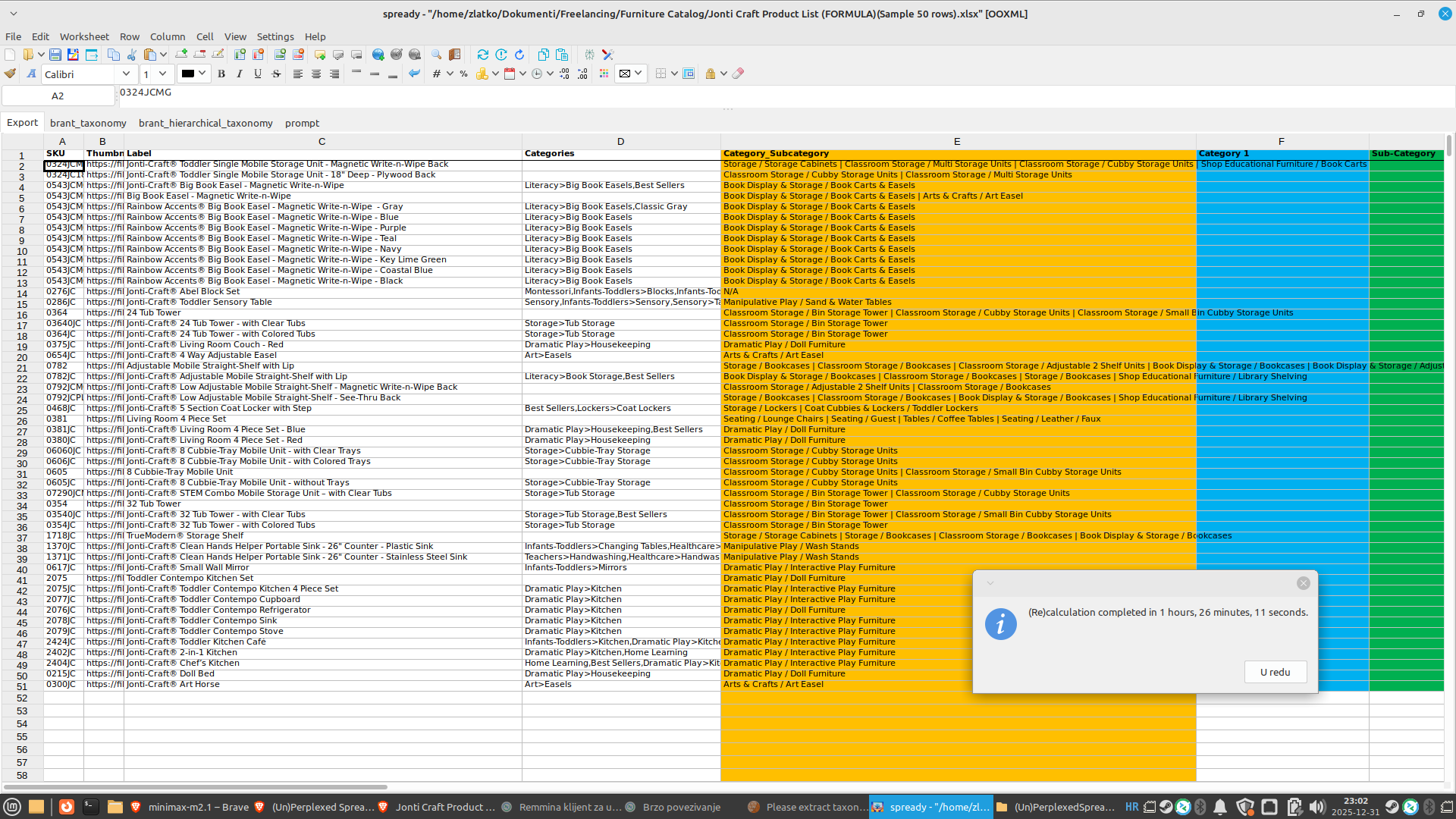
Since we also included web search with deep internet research, it required considerable time to perform the calculation. Without matasoft_web_search tool and prompt instructing web search it would be much, much faster. For his particular task we could have used simpler approach without web search, the names of the products would probably be sufficient information for the LLM to understand how to classify products, but we deliberatly wanted to demonstrate how web search can be combined with advanced reasoning, to provide superb results.
As you can see from the screenshot, the GLM-4.7 model was able to provide precise detailed mapping with the alternative 2-level taxonomy hierarchy, even to map with multiple applicable categories, as instructed by the prompt.

We exported the raw result into a csv file, using "Export as" option.

Using OpenRefine software we then further processed the csv file to transpose multiple mapped categories into separate rows and got the final result of mapping.

Conslusion
(Un)Perplexed Spready is a perfect tool for data extraction and data categorization tasks in textual spreadsheets. It can combine the most advanced LLM models (such as GLM-4.7, kimi-k2:1t or deepseek-3.2) with deep web research (e.g. utilizing Matasoft Web Search tool) with long context lookup taxonomy list, in order to provide accurate mapping and classification. We demonstrated this on particular real-life example of mapping a list of products to alternative lookup taxonomy.
As always, our moto is: let AI do the heavy job, while you drink your coffee! AI should be a tool which frees humans from tedious repetitive job, so that human intelect can have more time for creative work. And leisure too!
Why Choose (Un)Perplexed Spready?
-
Revolutionary Integration: Get the best of spreadsheets and AI combined, all in one intuitive interface.
-
Market-Leading Flexibility: Choose between Perplexity AI and locally installed LLM models, or even our remote free model hosted on our server—whichever suits your needs.
-
User-Centric Design: With familiar spreadsheet features seamlessly merged with AI capabilities, your productivity is bound to soar.
-
It's powerful - only your imagination and HW specs are limits to what can you do with the help of AI! If data is new gold, then the (Un)Perplexed Spready is your miner!
- It's fun - sure it is fun, when you are drinking coffee and scrolling news, while AI is doing the hard job. Drink your coffee and let the AI works for you!

Get Started!
Join the revolution today. Let (Un)Perplexed Spready free you from manual data crunching and unlock the full potential of AI—right inside your spreadsheet. Whether you're a business analyst, a researcher, or just an enthusiast, our powerful integration will change the way you work with data.
You can find more practical information on how to setup and use the (Un)Perplexed Spready software here: Using (Un)Perplexed Spready
Download
Download the (Un)Perplexed Spready software: Download (Un)Perplexed Spready
Request Free Evaluation Period
When you run the application, you will be presented with the About form, where you will find automatically generated Machine Code for your computer. Send us an email with specifying your machine code and ask for a trial license. We will send you trial license key, that will unlock the premium AI functions for a limited time period.
Contact us on following email:
Sales Contact
Purchase Commercial License
For a price of two beers a month, you can have a faithful co-worker, that is, the AI-whispering spreadsheet software, to work the hard job, while you drink your coffee!.
You can purchase the commercial license here: Purchase License for (Un)Perplexed Spready

AI-driven Spreadsheet Processing Services
We are also offering AI-driven spreadsheet processing services with (Un)Perplexed Spready software.
If you need massive data extraction, data categorization, data classification, data annotation or data labeling, check-out our corresponding services here: AI-driven Spreadsheet Processing Services

Further Reading
Download (Un)Perplexed Spready
Purchase License for (Un)Perplexed Spready
Leveraging AI on Low-Spec Computers: A Guide to Ollama Models for (Un)Perplexed Spready
(Un)Perplexed Spready with web search enabled Ollama models
Various Articles about (Un)Perplexed Spready
Try (Un)Perplexed Spready in Your Browser
