
Project
In this example project task was to detect matching records from two different product catalogs.
There are 1082 records in "Abt" catalog and 1093 records in "Buy" catalog. It is known that there are 1097 true matching pairs.
Several example solutions are included, to demonstrate how varying parameters influence end-result.
It is demonstrated how using dictionaries (lexemization) can be useful in case when we fuzzy match long strings, such as verbose product descriptions.

Input Datasets Import
Left Dataset Schema Definition
"Abt" product catalog Excel file, containing 1082 records has been registered and imported as "left" dataset for fuzzy matching. During file registration, it has been automatically converted to a .tab text file format and then imported into PostgreSQL database.

Right Dataset Schema Definition
"Buy" product catalog Excel file, containing 1093 records has been registered as "right" dataset for fuzzy matching. During registration, it has been automatically converted into a .tab format text file and imported into Postgresql database afterwards.

Fuzzy Match Solution
Identify Matching Records
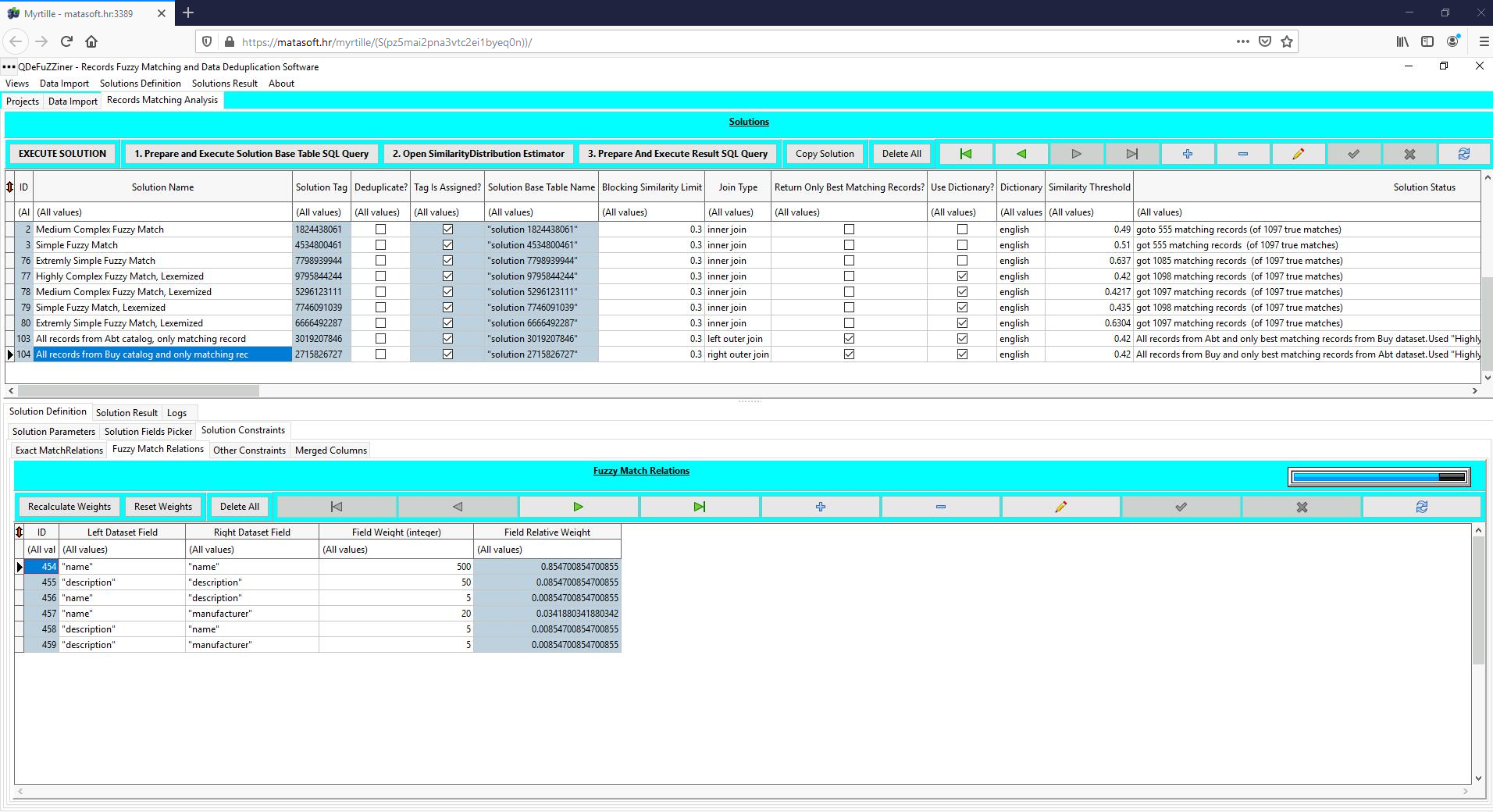
We have been experimenting with several fuzzy matching constraints definitions, which you can explore on your own. In all solutions, applying dictionary (i.e. lexemization) returned better results.
We were able to find appropriate threshold to pick-up all true matches (it is known that there are 1097 true matches).


Under Solution Constraints /Fuzzy Match Relations, there are multiple field pairs combinations defined, with different weights assigned. Besides main columns being paired, additional potentially useful combinations of column pairs are also included. Such additional combinations sometimes improve fuzzy matching, but in many cases is contra-productive.
This example demonstrates how using dictionaries can improve fuzzy matching in circumstances when we have long strings, such as verbose descriptions.

If you click on the "Open Similarity Distribution Estimator", you can see how distribution of matches and non-matches in the underlying solution table looks like. By using this visual tool, you can assess range for searching optimum threshold value.


Merge Two Product Catalogs
Once we have found optimum parameters for fuzzy matching, we can copy the selected project into a new project and change the parameters for returning merged product catalog. We have set parameters to return all records from "Buy" catalog (right dataset) and only best matching records "Abt" catalog (left dataset).


Notice options "right outer join" and "Return Only Best Matching Records".

We have also defined merged columns, with various merging types chosen.

Solution Result
Solution can be executed in one or several steps, by using appropriate buttons.

Once the solution has been executed and resultset retrieved, it is saved in the database and can be opened anytime, by using appropriate buttons.


Further Reading
Introduction To Fuzzy Data Matching
Data Matching Flow
Managing QDeFuZZiner Projects
Importing Input Datasets into QDeFuZZiner
Managing QDeFuZZiner Solutions
Demo Fuzzy Match Projects
Various Articles on QDeFuZZiner
Our Data Matching Services
Do you wish us to perform fuzzy data matching, de-duplication or cleansing of your datasets?
Check-out our data matching service here: Data Matching Service
