
Advanced Statistics in (Un)Perplexed Spready — Professional Statistical Tool for Free
Introduction
(Un)Perplexed Spready is a spreadsheet application that combines the power of traditional spreadsheets with advanced artificial intelligence capabilities. Version 1.2.X represents the biggest leap in the application's history, bringing a range of features that elevate data work to an entirely new level.
This version introduces four major improvement areas: Web Search, Vision & Document Processing, SQL Query, and Advanced Statistics.
Best of all, SQL Query and Advanced Statistics functions are completely free! If you are looking for a free statistical software, you are on the right page!
Statistical analysis is an essential tool in many fields — from scientific research, through business analysis, to production quality control. Professional statistical packages are usually expensive and require separate installation.
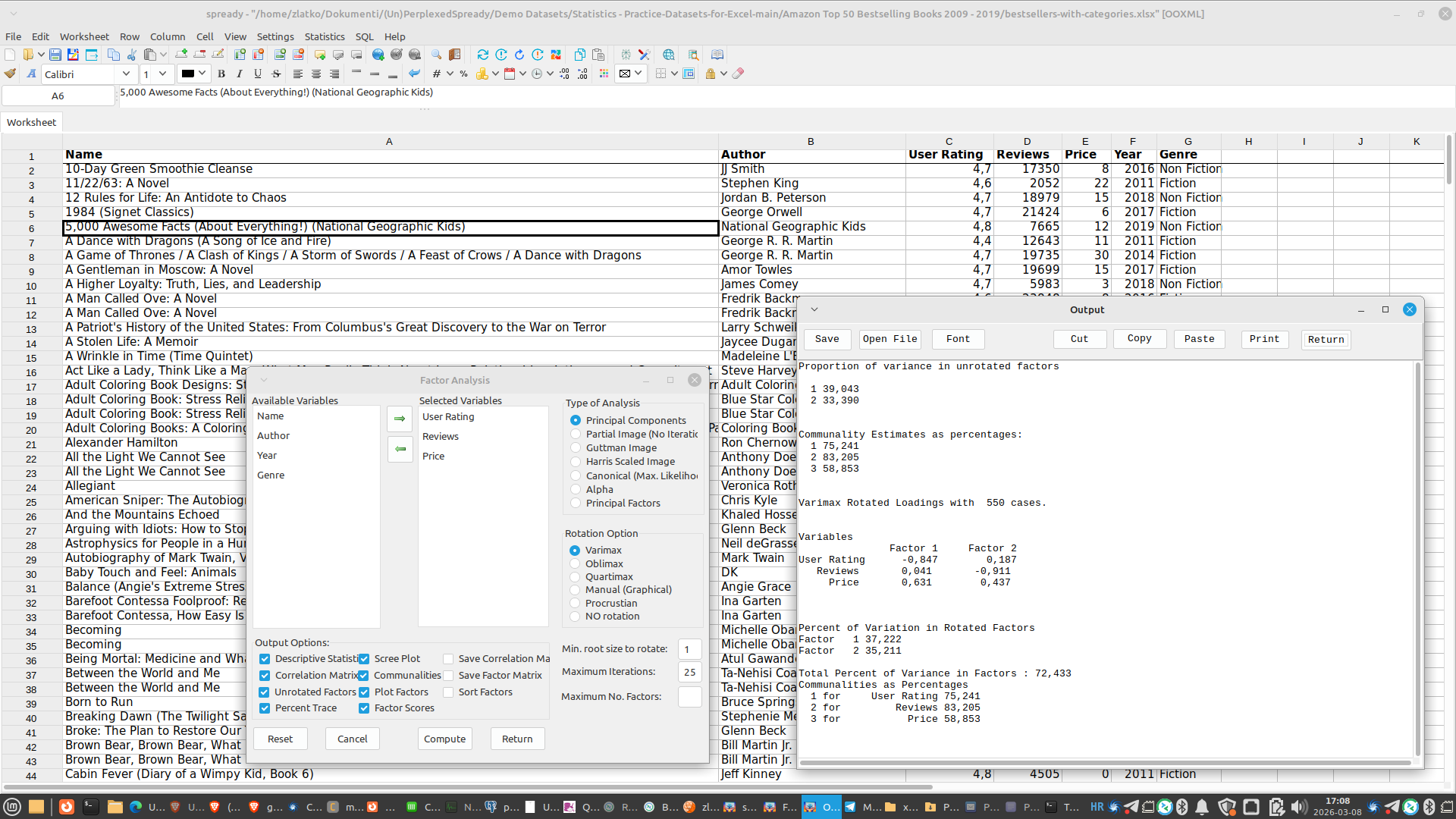
(Un)Perplexed Spready v1.2.X integrates TyphonStats (based on LazStats by William G. Miller), a complete statistical package that works directly on data from your sheets — no need to export to CSV or other formats.
Best of all: Statistics is FREE — forever!
What is TyphonStats?
TyphonStats is a completely free, open-source statistical package that includes:
- 130+ statistical procedures
- Descriptive statistics
- Parametric and non-parametric tests
- Regression analysis
- Multivariate analysis
- Statistical Process Control (SPC)
- Measurement and evaluation
- Data visualization
All functions are available directly from the Statistics menu in (Un)Perplexed Spready.


Categories of Statistical Functions
1. Descriptive Statistics
Basic data analysis:
| Function | Description |
|---|---|
| Descriptive Statistics | Measures of central tendency and dispersion |
| Frequency Analysis | Frequency distribution |
| Grouped Frequencies | Grouped frequencies |
| Cross-tabulation | Cross tables |
| Breakdown | Analysis by groups |
| Box Plot | Box-and-whisker diagram |
| Normality Test | Test of distribution normality |
Example: Test results analysis
— Select column with results
— Statistics → Descriptive Statistics
— Get: mean, median, standard deviation, quartiles, etc.
2. Parametric Tests
For data following normal distribution:
| Test | Description |
|---|---|
| One-Sample T-Test | Compare sample with known value |
| Paired T-Test | Compare paired samples |
| Independent T-Test | Compare two independent groups |
| One-Way ANOVA | Compare more than two groups |
| Two-Way ANOVA | Compare with two factor variables |
| Proportion Differences | Compare proportions |
Example: Comparing results of two groups
— Data: column A (group 1), column B (group 2)
— Statistics → Parametric Tests → Independent T-Test
— Result: t-value, p-value, conclusion
3. Non-Parametric Tests
For data not following normal distribution:
| Test | Description |
|---|---|
| Mann-Whitney U | Non-parametric alternative to Independent T-Test |
| Wilcoxon Signed-Rank | Non-parametric alternative to Paired T-Test |
| Kruskal-Wallis | Non-parametric alternative to One-Way ANOVA |
| Spearman Correlation | Non-parametric correlation |
| Chi-Square Goodness of Fit | Test match with expected distribution |
| Chi-Square Independence | Test independence of variables |
| Kendall's Tau | Non-parametric correlation |
Example: Comparing grades (non-normal distribution)
— Data: column A (group 1), column B (group 2)
— Statistics → Non-Parametric → Mann-Whitney U
— Result: U statistic, p-value
4. Correlation and Regression
Analysis of relationships between variables:
| Function | Description |
|---|---|
| Pearson Correlation | Linear correlation |
| Spearman Correlation | Rank correlation |
| Kendall's Tau | Alternative rank correlation |
| Linear Regression | Simple linear regression |
| Multiple Regression | Multiple regression |
| Logistic Regression | Binary logistic regression |
| Forward Stepwise | Stepwise regression (forward) |
| Backward Stepwise | Stepwise regression (backward) |
Example: Sales forecasting
— Data: column A (sales), column B (marketing), column C (price)
— Statistics → Regression → Multiple Regression
— Result: coefficients, R², p-values
5. Multivariate Analysis
Advanced analysis with multiple variables:
| Function | Description |
|---|---|
| MANOVA | Multivariate ANOVA |
| Discriminant Analysis | Discriminant analysis |
| Hierarchical Clustering | Hierarchical clustering |
| K-Means Clustering | K-means clustering |
| Factor Analysis | Factor analysis |
| Path Analysis | Path analysis |
Example: Customer segmentation
— Data: multiple variables (age, income, behavior)
— Statistics → Multivariate → K-Means Clustering
— Result: customer groups with similar characteristics
6. Statistical Process Control (SPC)
For quality control in production:
| Chart | Description |
|---|---|
| X-Bar Chart | Control chart for mean values |
| R Chart | Control chart for range |
| S Chart | Control chart for standard deviation |
| CUSUM | Cumulative sum |
| C Chart | Control chart for defect count |
| P Chart | Control chart for proportion |
Example: Monitoring production quality
— Data: sample measurements over time
— Statistics → SPC → X-Bar Chart
— Result: control chart with limits
How to Use
Basic Workflow
- Prepare data — Data should be in columns on a single sheet
- Select Statistics menu — Choose desired statistical function
- Configure analysis — Select variables, settings, etc.
- Run analysis — Click OK
- Review results — Results appear in output window
Data Transfer
TyphonStats automatically transfers data from the active sheet:
- First row is used as variable names
- Data is analyzed by columns
- No need to export to CSV
Credits
TyphonStats/LazStats was developed by William G. Miller and is distributed as open-source software.
All credit for statistical algorithms and implementation goes to William G. Miller.
Matasoft integrated TyphonStats into (Un)Perplexed Spready with full respect for the original author and open-source community.
Comparison with Other Tools
| Tool | Price | Statistics | Built-in | Offline |
|---|---|---|---|---|
| (Un)Perplexed Spready | Free | 130+ functions | ✅ | ✅ |
| SPSS | ~$100/month | Advanced | ❌ | ✅ |
| Minitab | ~$50/month | Advanced | ❌ | ✅ |
| R | Free | Complete | ❌ | ✅ |
| Python + libraries | Free | Complete | ❌ | ✅ |
Download LazStats (TyphonStats) User Manual
TyphonStats (LazStats) by Bill Miller is complex and comprehensive statistical tool which numerous functions and options cannot be covered in one article. If you want to learn more about it, please read the LazStats User Manual which you can download here: https://matasoft.hr/User_Manual_for_LazStats.pdf
Conclusion
Statistical analysis in (Un)Perplexed Spready brings professional statistical tools directly to your spreadsheet. No additional costs, no separate installation, no data export.
Whether you're a researcher, analyst, or quality engineer — you have the power of statistics at your fingertips.
Statistics is and will always be FREE!
© 2026 Matasoft.
TyphonStats/LazStats by William G. Miller
Further Reading
(Un)Perplexed Spready v1.2.X — A New Chapter in AI-Powered Spreadsheets
Introduction to (Un)Perplexed Spready
Download (Un)Perplexed Spready
Purchase License for (Un)Perplexed Spready
