
Try (Un)Perplexed Spready in Your Browser
Pre‑Configured AI Spreadsheet Portal – No Install, Just Start Working
Adopting an AI‑powered spreadsheet sounds great—until you realise you need to wire together an LLM, a web UI, a meta‑search engine, and custom tools just to run your first useful formula with an embedded prompt.
The new online (Un)Perplexed Spready portal removes that barrier: open a URL, start a free session, and test real AI formulas in real spreadsheets—without installing anything or touching infrastructure.
What is (Un)Perplexed Spready?
(Un)Perplexed Spready is a next‑generation spreadsheet that thinks: it embeds advanced language models (LLMs) directly into spreadsheet formulas, so you can extract, classify, enrich, and transform data using natural‑language prompts inside cells.
It combines familiar spreadsheet features (formatting, copy/paste, sorting) with AI‑powered functions like PERPLEXITY, ASK_LOCAL and ASK_REMOTE for tasks that traditional formulas cannot handle, such as free‑text extraction, taxonomy mapping, and intelligent classification.
Until now, the most powerful configurations required setting up your own AI stack—Ollama or Ollama Cloud, Open WebUI, SearXNG, and Matasoft tools—following detailed guides given here: (Un)Perplexed Spready with web search enabled Ollama models and here: An example of using (Un)Perplexed Spready in a real life use case - Furniture catalog taxonomy classification
For many users, however, that level of setup was more than they wanted before simply answering one question: “Can this actually help with my spreadsheets?”
New: Online Spready Portal (Browser Version)
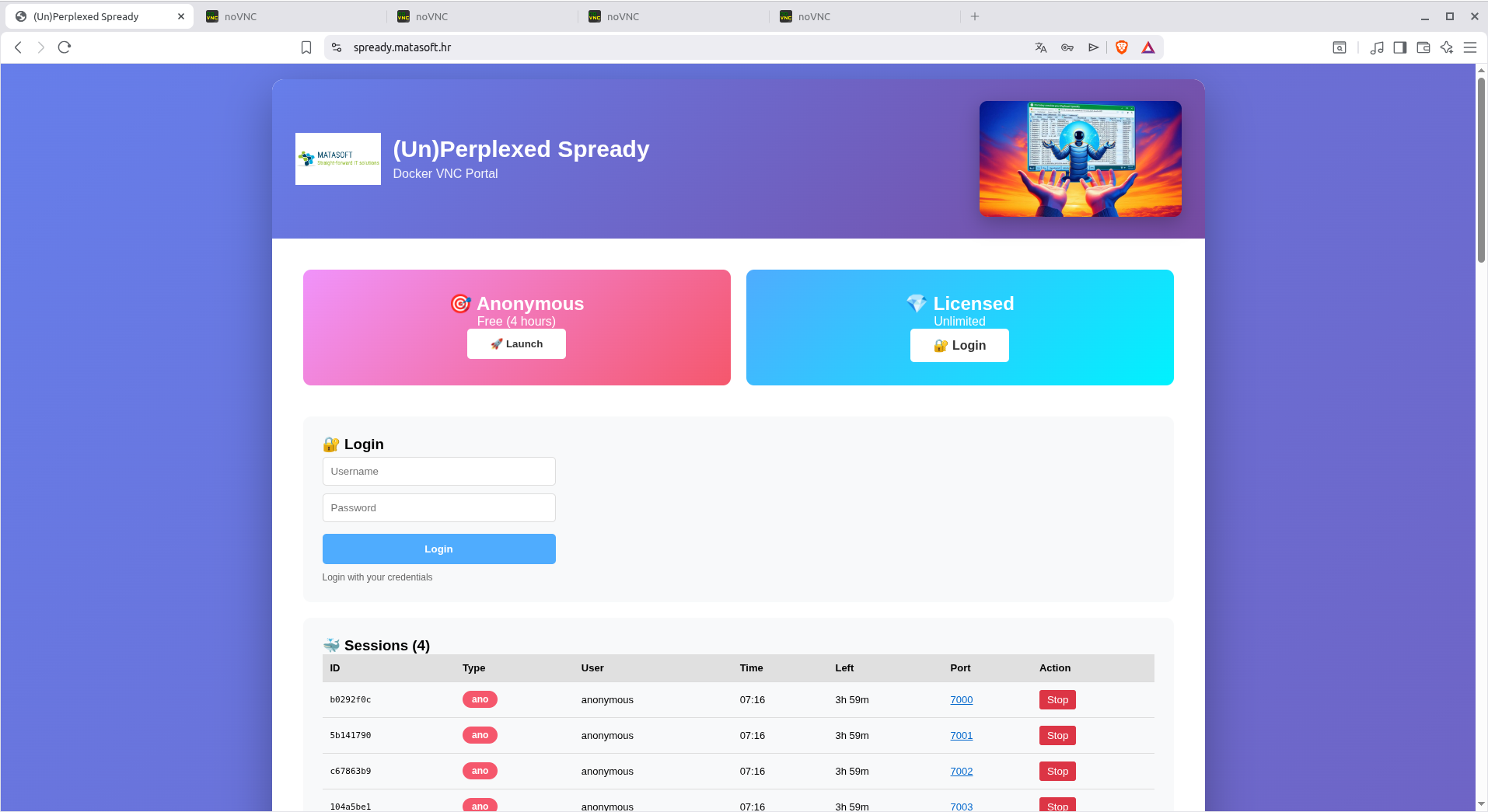
You can now run (Un)Perplexed Spready directly in your browser at:

The portal exposes (Un)Perplexed Spready as a hosted web application with two main modes:
-
Anonymous – Free (4 hours)
-
Start a session without login and use the full AI‑enabled environment for up to 4 hours per anonymous session.
-
-
Licensed – Unlimited
-
Log in with your license for effectively unlimited usage, ideal for regular production‑style work.
-
From the moment your session starts, you see a file list and can open demo workbooks or upload your own spreadsheets, all running on the pre‑configured AI stack.
Everything is Pre‑Configured for You
Behind the scenes, the online portal wires together all the components that previously required careful local setup:
-
Ollama / Ollama Cloud LLM model
-
A strong open‑source model (e.g. GLM‑4.7) is already configured via an Open WebUI endpoint, so ASK_LOCAL / ASK_REMOTE‑style formulas have a working model out of the box.
-
-
Open WebUI endpoint
-
Open WebUI is installed and integrated as the API layer, providing a stable, OpenAI‑compatible interface that Spready uses for its AI functions.
-
-
SearXNG meta‑search
-
A SearXNG instance is set up and tuned for JSON output, allowing AI formulas to perform web‑augmented tasks (like research‑based classification and enrichment) without you touching search engine configuration.
-
-
Matasoft Web Search & Web Reader tools
-
matasoft_web_searchandmatasoft_web_readerare installed and integrated, combining BeautifulSoup + Selenium with JS/SPA heuristics so the LLM can access real page content, not empty shells.
-
All of this is already in place on the portal, so you can focus on what the AI should do in your spreadsheet—not how to connect the pieces.
40+ Demo Spreadsheets Ready to Explore
The portal ships with a rich library of demo workbooks, visible immediately when you connect:
-
Files such as:
-
Demo2_Product Catalog1 (ASK_LOCAL).xlsx -
Demo2_Product Catalog1 (ASK_REMOTE).xlsx -
Demo30_Webinar_Invites (ASK_LOCAL).xlsx -
Demo40_Schools_Research (ASK_LOCAL).xlsx, and many others.
-

-
Each demo contains:
-
Pre‑defined AI formulas (PERPLEXITY / ASK_LOCAL / ASK_REMOTE) with prompts already written.
-
Example input columns (product names, categories, emails, descriptions, etc.) - from very simple to quite complex inputs (like whole taxonomy lookup list ranges).
-
Output columns that show concrete tasks: taxonomy mapping, entity extraction, enrichment, classification, annotation, and more.
-
This makes the portal ideal for learning by example:
-
Open any demo workbook.
-
Inspect the formulas and the prompt text.
-
Change the prompt or tweak the ranges.
-
Hit recalc and see how the AI behaviour changes—no configuration required.
Before you start experimenting, it is advisable that you first read introductory article here: Introduction to (Un)Perplexed Spready and this article: Using (Un)Perplexed Spready where you can learn basics about this software design and usage.
What Can You Do in the Online Sandbox?
The online (Un)Perplexed Spready is not a toy demo; it mirrors real‑world business scenarios.
-
Product taxonomy classification
-
Map thousands of SKUs from an internal taxonomy into a new 2‑level taxonomy using formulas like
ASK_LOCAL3, with product name, internal category, and target taxonomy list as inputs.
-
-
Data extraction from unstructured text
-
Pull attributes (sizes, units, materials, countries, contact details) out of raw descriptions into structured columns using natural‑language prompts.
-
-
Standardisation & reformatting
-
Reformat addresses, normalize names, unify category labels, and standardize free‑text fields at scale.
-
-
Enrichment with web research
-
Use the integrated SearXNG + Matasoft tools so the model can research products, companies, or institutions, then classify or enrich rows based on external information.
-
-
Annotation, labeling, and classification
-
Build multi‑label classification workflows where formulas return multiple categories separated by a delimiter, ready for downstream splitting and analytics.
-
And because it’s still a spreadsheet, you retain full control:
-
Filter, sort, and review outputs.
-
Export to CSV for loading into PIM, ERP, databases, or tools like OpenRefine.
-
Duplicate demo sheets and adapt them to your own datasets.
Few notes:
- ASK_REMOTE is set up without web search tool, you can use it for fast and powerful intelligent data processing when no internet search is required. (Be aware that enabled web search feature dramatically increase processing time!). Of course you can achieve similar result by deleting web search tool from the setup for Ollama model used for ASK_LOCAL, however, ASK_REMOTE will still be faster because it uses direct API endpoint to Ollama, while ASK_LOCAL uses API endpoint of Open WebUI, which is slower. So, use ASK_REMOTE for fast processing, whenever you can!
- All demo spreadsheet are protected, so you cannot save the changes. However you can use Save As to save them under another name and then you can save modifications. You can also upload and download documents.
- Each user has it's own folder with documents. Registered users therefore have private folders, while anonymous sessions all share the same public folder. If you want to try calculate your own spreadsheet with sensitive data, please contact us to provide you registestered private sandbox. Contact us on Sales Contact
Why an Online Version Matters
Even though the full self‑hosted setup is documented in detail, combining Ollama/Ollama Cloud, Open WebUI, SearXNG, and the Matasoft tools can feel complex for many regular users.
The online portal changes the adoption journey:
-
Zero install – no desktop setup, no Docker, no local servers.
-
Fast evaluation – within minutes you’re editing prompts and recalculating formulas instead of reading deployment docs.
-
Realistic stack – you’re testing on the same architectural pattern you would eventually use in production (LLM + web UI + meta‑search + web reader), just hosted for you.
This makes it much easier for you to answer:
-
Does (Un)Perplexed Spready solve my specific spreadsheet problems?
-
Can my team understand and maintain prompt‑driven formulas?
-
Does the AI stack handle our taxonomy, data volume, and complexity?
Only after you’re confident in the answers do you need to decide between continuing online, moving to desktop, or self‑hosting.
Relationship to Desktop Versions
The online portal complements—rather than replaces—the existing desktop offerings:
-
Desktop (Windows / Linux)
-
Download from the “Download (Un)Perplexed Spready” page. [Download (Un)Perplexed Spready]
-
The core spreadsheet functionality is free.
-
Premium AI functions (PERPLEXITY / ASK_LOCAL / ASK_REMOTE) require a license key, which you obtain using the Machine Code shown in the About form.
-
-
Online Portal
-
Browser access at
spready.matasoft.hr.[spready.matasoft] -
Free Anonymous – 4 hours tier for quick tests and experimentation.
-
Licensed – Unlimited tier for regular and heavier usage without time limits.
-
A typical path:
-
Prototype and learn using the online sandbox and demo workbooks.
-
Once convinced, choose:
-
Stay online (licensed unlimited).
-
Or move to desktop + self‑hosted stack for full control and privacy.
-
Who Should Try the Online Version?
The browser‑based (Un)Perplexed Spready is ideal for:
-
E‑commerce and catalog teams
-
Mapping product taxonomies, cleaning supplier feeds, enriching SKUs.
-
-
Data and analytics professionals
-
Turning messy text columns into structured features without having to build a separate ML pipeline.
-
-
Operations and back‑office teams
-
Standardizing entries, classifying tickets or requests, labeling entities directly in the tools they already use.
-
-
Consultants and freelancers
-
Demonstrating value quickly to clients—open a browser, load a sheet, show AI‑driven formulas in action.
-
-
Anyone evaluating AI spreadsheets
-
If you’ve read the setup guides and thought “this looks powerful but a bit much for a first trial,” the online portal is your low‑friction entry point.
-
Getting Started in a Few Minutes
-
Open the portal
Go to https://spready.matasoft.hr in your browser.[spready.matasoft]
- Start a free session
Choose Anonymous – Free (4 hours) to experiment without logging in.


- Pick a demo workbook
Open one of the 40+ demo XLSX files (e.g. taxonomy matching, product catalogs, webinar invites).


Notice: demo spreadsheets are placed in /spready/files folder.
- Adjust screen size to spreadsheet and formulas

- Select a range and execute AI formulas
Depending on how complex AI prompt or input data is, and especially whether web search is used, execution of AI formulas can be fast or extremely slow. Therefore, it is not for inpatient people!
In (Un)Perplexed Spready there is a deliberate deferring mechanism for AI formulas, ensuring that AI calculation is triggered only when user explicitly decides to run it.
There are three buttons available to run AI formulas:


Those commands are also present in the toolbar.

Command "Recalculate Formulas" will trigger calculation of the whole spreadsheet. If there are many cells with AI-driven formulas, depending on the AI model used, your HW specs or Perplexity rate limits (and consequent API calls delay) this might take significant time. Use this option when you are sure that formulas are correctly set.
Command "Recalculate Selected Cell" triggers calculation of only the selected cell. Use it to check whether your formula works correctly.
Command "Recalculate Selected Range" is similar to the previous one, but triggers calculation for multiple selected cells.
Practical advice: Always first start by selecting only one cell or a small range to test the formulas.


-
Inspect results and tweak AI formulas
Check results, look at the AI formulas and prompts, adjust the instructions, and recalculate to see new results. Some formulas are very simple, while some include complex input ranges (e.g. taxonomy lookup list) or complex long prompts placed in another sheet.


- Export resultset into csv file
When you save the spreadsheet, only AI formulas will be saved, calculated values are not saved. If you wish to preserve calculated results, you need to export result into a CSV file.


- Try your own data
When ready, upload a small sample of your own spreadsheet and adapt one of the demos to your structure.
- Decide next steps
If you like the results, continue with licensed online access or move to desktop/self‑hosted deployments using the download and purchase pages on [Purchase License for (Un)Perplexed Spready]
If you get stuck at any point, contact us via Sales Contact for a private sandbox or support.
Further Reading
Introduction to (Un)Perplexed Spready
Download (Un)Perplexed Spready
Purchase License for (Un)Perplexed Spready
