Web Search in (Un)Perplexed Spready — Search, Process, Decide
Introduction
(Un)Perplexed Spready is a spreadsheet application that combines the power of traditional spreadsheets with advanced artificial intelligence capabilities. Version 1.2.X represents the biggest leap in the application's history, bringing a range of features that elevate data work to an entirely new level.
This version introduces four major improvement areas: Web Search, Vision & Document Processing, SQL Query, and Advanced Statistics.
Best of all, SQL Query and Advanced Statistics functions are completely free! If you are looking for a free statistical software, you are on the right page!
One of the biggest limitations of traditional spreadsheet applications is the inability to access up-to-date information from the internet. When you need current exchange rates, the latest news about regulatory changes, or product prices — you have to manually search and enter the data.
(Un)Perplexed Spready v1.2.X removes this limitation. Web Search functionality allows you to search the internet directly from spreadsheet cells and process results using AI models.
While (Un)Perplexed Spready has already supported usage of external Web Search tools via Open WebUI endpoints, now it also provides an alternative with integrated web search features, eliminating need for setting up Open WebUI middleware. All you need is installed Ollama with your preferred LLM model.
Three Formula Families
WEBSEARCH — Direct Search with LLM Summarization
The simplest option. The formula executes a web search, retrieves results, and sends them to a local LLM for summarization.
Syntax:
=WEBSEARCH(query)
=WEBSEARCH0(query) — same as WEBSEARCH
=WEBSEARCH1(query, filter)
=WEBSEARCH2(query, filter, maxResults)
Examples:
=WEBSEARCH("current EUR/USD exchange rate")
=WEBSEARCH1("llama3.1 changelog", "site:ollama.com")
=WEBSEARCH2("EU pharma serialization regulation", "site:ema.europa.eu", 5)
When to use: When you want search results processed by your local LLM.
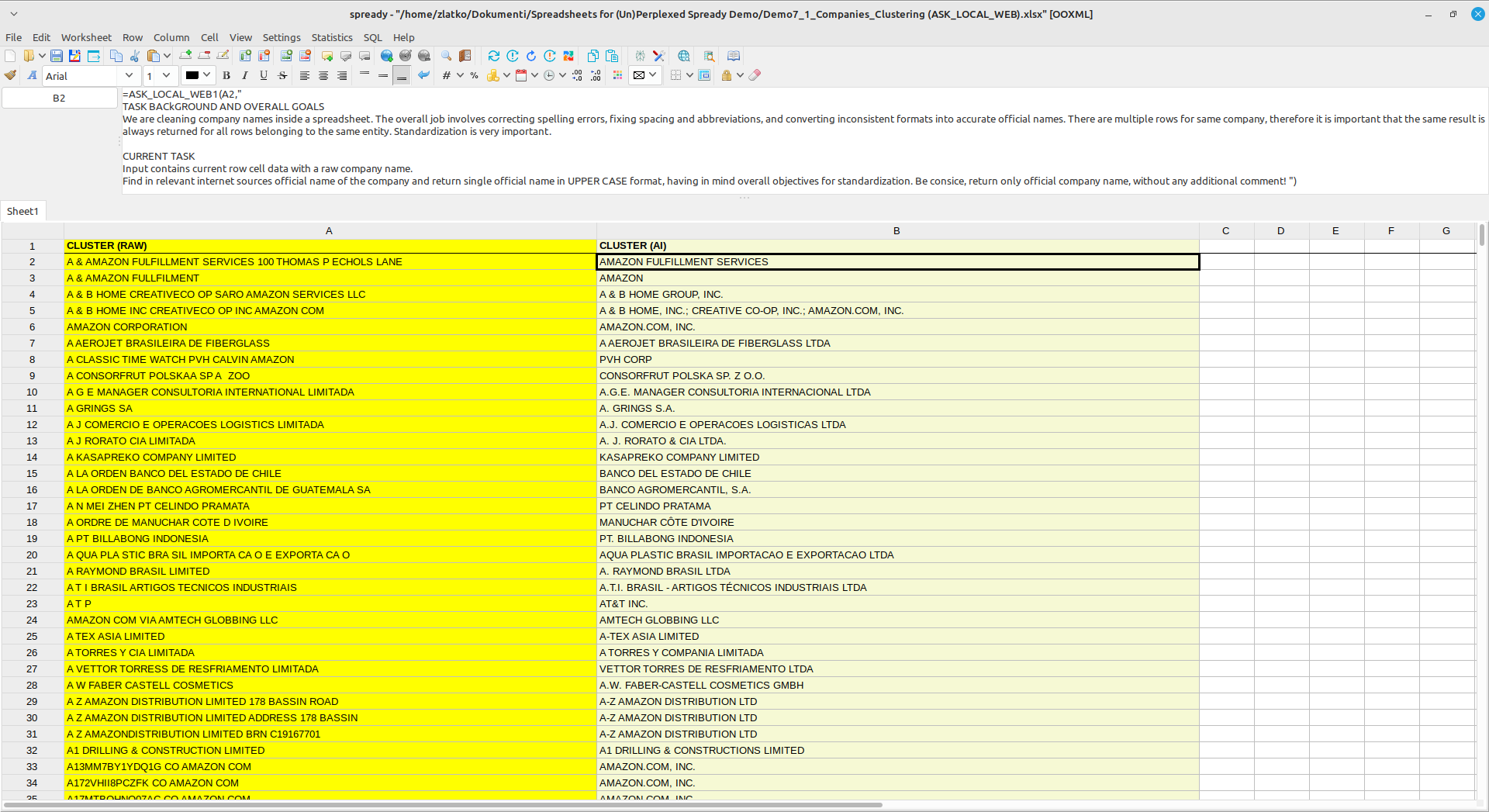
ASK_LOCAL_WEB — Intelligent Search with Local AI
Advanced option. The local AI model receives your question and decides itself whether to search the web or answer from existing knowledge.
Two-round process:
1. Round 1: Model receives question + web_search tool definition
- If the question requires current data → model calls tool → Round 2
- If the model can answer from knowledge → direct answer (faster, no search)
2. Round 2: Application executes WebSearch() and sends results to model
- Model processes results and gives final answer
Syntax:
=ASK_LOCAL_WEB(prompt)
=ASK_LOCAL_WEB1(input, instruction)
=ASK_LOCAL_WEB2(input1, input2, instruction)
=ASK_LOCAL_WEB3(input1, input2, input3, instruction)
Examples:
=ASK_LOCAL_WEB("What is the current EUR/USD exchange rate?") — model will search
=ASK_LOCAL_WEB("What is the capital of France?") — model will NOT search
=ASK_LOCAL_WEB1(A2, "Find the current price of this product")
When to use: When you want AI to intelligently decide whether a search is needed, using a local model.
Note: Requires a model that supports function-calling (llama3.1, mistral-nemo, qwen2.5, qwen2.5-coder). Older models (llama2, mistral 0.1) will answer directly without searching.
ASK_REMOTE_WEB — Intelligent Search with Remote AI
Same as ASK_LOCAL_WEB, but uses a remote server (configured in source code).
When to use:
- Local hardware is too slow for tool-calling models
- You want to use a more capable remote model
- Local instance is busy
Supported Search Engines
| Engine | Auth Required | Notes |
|---|---|---|
| SearXNG | No | Requires local instance |
| DuckDuckGo | No | Always available, no key needed |
| Mojeek | No | Independent search engine |
| Startpage | No | Google-powered, privacy-focused |
| Wikipedia | No | Best for factual/encyclopedic queries |
| Wikidata | No | Structured entity data |
| Brave | API key | Free tier: 2,000 req/month |
| Google CSE | API key + CX | Free tier: 100 req/day |
| Bing | API key | Microsoft Azure subscription |
All engines are configured in Settings > Web Search Settings.


Practical Applications
Finance and Exchange Rates
=ASK_LOCAL_WEB("Current EUR/USD exchange rate")
=ASK_LOCAL_WEB("Current gold price per ounce")
=WEBSEARCH("Mortgage interest rates Croatia 2026")
Regulatory Information
=ASK_LOCAL_WEB("FDA pharmaceutical serialization requirements 2026")
=WEBSEARCH1("EU FMD regulation", "site:ema.europa.eu")
=ASK_LOCAL_WEB1(A5, "Find the current regulatory status for this drug")
Market Intelligence
=ASK_LOCAL_WEB("Latest news about OpenAI model releases")
=WEBSEARCH2("pharma industry trends 2026", "", 10)
=ASK_LOCAL_WEB2(A2, B2, "Compare current market prices for both products")
Cross-Sheet Range Reference
You can use data from other sheets:
=ASK_LOCAL_WEB1("RANGE:Products!A2:A50", "Find the price for each product")
Format: "RANGE:SheetName!A1:B100"
Recalculation
Web Search formulas do NOT recalculate automatically on every edit — this is intentional to avoid unnecessary API calls.
Recalculation triggers:
- Edit and confirm the cell containing the formula
- Menu > Recalculate Selected Cell
- Menu > Recalculate Selected Range
- Menu > Recalculate All Formulas
Tip: Enable Settings > Defer Formula Calculation while building a spreadsheet with many web-search formulas, then trigger recalculation manually when ready.
Tips and Important Notes
- Cell references are fully supported in all arguments. Query and instruction can come from other cells.
- Execution time depends on: number of enabled search engines, Target Results setting, network speed. Typical range: 10 – 60 seconds per cell.
- Wikipedia and Wikidata are recommended for factual queries — they are fast, reliable, and have no anti-bot protection.
- Use Custom Copy/Paste (not OS default Ctrl+V) to ensure cell references are adjusted correctly.
Error Messages
| Error | Meaning |
|---|---|
| APIERR | HTTP error or network unreachable |
| LICENSE LOCKED | Premium features not activated |
| Deferred | Calculation deferred — trigger manually |
| N/A | Model could not produce an answer |
Privacy and Security
- Local models: Data stays on your computer
- Web searches: Go through selected search engines
- No storage: Search history is not saved
- No tracking: Your queries are not tracked
Download and read Web Search manual
You can download related manuals here:
https://matasoft.hr/WebSearch_Functions_Guide.pdf
https://matasoft.hr/WebSearch_Functions_Guide_Full.pdf
https://matasoft.hr/AI_Formula_Functions_Guide.pdf
Conclusion
Web Search in (Un)Perplexed Spready opens entirely new possibilities for working with spreadsheets. You are no longer limited to static data — you can retrieve up-to-date information directly into cells and process it with AI.
Whether you're tracking exchange rates, prices, regulatory changes, or news — Web Search formulas give you the power of the internet directly in your spreadsheet.
Web Search is a PREMIUM feature. Requires AI model (local or cloud).
© 2026 Matasoft.
Further Reading
(Un)Perplexed Spready v1.2.X — A New Chapter in AI-Powered Spreadsheets
Introduction to (Un)Perplexed Spready
Download (Un)Perplexed Spready
Purchase License for (Un)Perplexed Spready